Ha többen dolgoztok ugyanazokon a repókon, mindenki a saját offtrack-projektjében, feladatot adhattok át egymásnak, és látjátok, hol tart a közös munka. A másik szálaiba és tételeibe senki nem nyúlhat bele. Az oldal egy csapaton mutatja be: Neo fejlesztő, Trinity üzleti elemző (BA), Morpheus projektmenedzser (PM). Az általános használat a használati útmutatóban van.
Fogalmak
Becenév: rövid név, amelyet te választasz. A munkatársaid csak ezt látják rólad: az e-mail-címedet és a nevedet nem.
Munkatárs: becenévvel rendelkező felhasználó, aki ugyanazon a repón dolgozik, mint te, vagy akivel már együttműködsz.
Együttműködés: megállapodás a te egyik projekted és a munkatárs egyik projektje között, feladat- vagy projektszinten. Két emberé: a projektjeid tagjai nem látják a munkatárs oldalát. Ugyanazzal a munkatárssal több projektpárban is dolgozhatsz, páronként más szinten.
Közös feladat: a munkatársnak átadott vagy tőle kapott tétel, illetve a vele megosztott saját tételed, a hozzá kapcsolt tételekkel együtt.
Repócímke: a tételen látszó repónév, például „api · web”: ezeket a repókat érinti a tétel.
Becenév
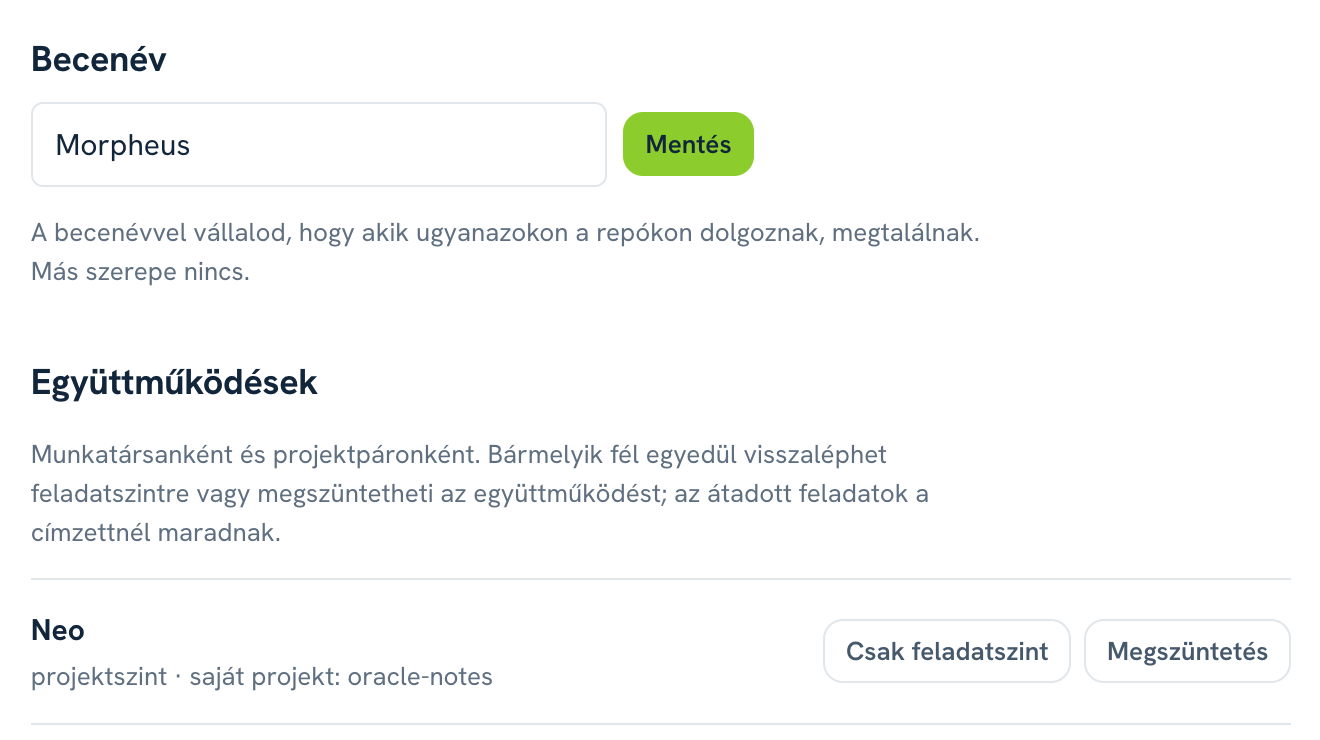
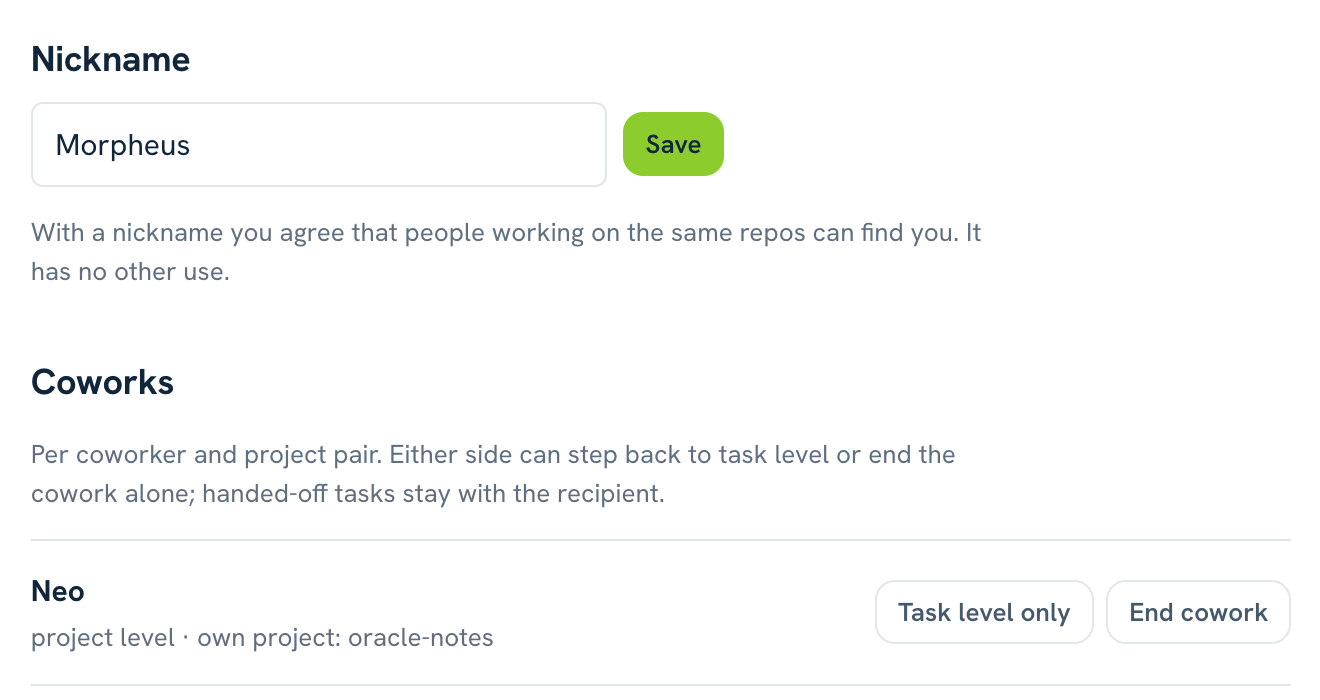
A becenevet a Fiókom oldalon vagy az offtrack nick neo paranccsal állítod be. 2–24 karakter, egyedi a szerveren, a kis- és nagybetű nem számít. A becenévvel vállalod, hogy aki ugyanazon a repón dolgozik, megtalál: megjelensz az offtrack coworkers kimenetében. Más szerepe nincs. Becenév nélkül senki nem talál meg.
Az offtrack nick "" törli. Ezután nem szerepelsz a lekérdezésben, a meglévő együttműködéseid megmaradnak, és a függő felkéréseid is elfogadhatók: a címzett a felkéréskori becenevedet látja. A törölt becenevet más nem veheti fel, így a régi munkatársaidnál nem keveredhet össze két ember.
Azt, hogy ki dolgozik még egy repón, csak az kérdezheti le, aki maga is dolgozik rajta: a kliens a repó lenyomatával kérdez, és a szerver csak olyan lenyomatra válaszol, amelyet a kérdező is ismer. A válasz csak beceneveket ad, és mellettük azt, hogy van-e már köztetek együttműködés.
Feladatszint: közös feladatok
Trinity specifikálta az új számlázási végpontot a saját projektjében, és a sessionjében ezt kéri: „add át Neónak fejlesztésre”. Claude az offtrack_reportto: "Neo" mezőjével adja át. A tétel Neo projektjének fő szálára kerül, Trinity tétele lezárul, és létrejön köztük a feladatszintű együttműködés.
Kinek adhatsz át: annak, aki a feladat valamelyik repóján dolgozik, vagy akivel a projekted már együttműködik. Repócímke nélküli tételt csak meglévő munkatársnak.
Melyik projektjébe kerül: abba, amelyik már együttműködik a te projekteddel; különben abba, amelyiknek a gyökerei között ott a feladat repója. A címzett áthelyezheti a saját projektjei között, és az együttműködés követi: Trinity továbbra is látja, archivált szálon is, az áthelyezés előtt hozzá kapcsolt tételekkel együtt.
Előrehaladás: amíg Neo sessionje a feladatot folyamatban tartja, a további jelentései (megállók, új nyitott ágak) a feladathoz kapcsolódnak. Trinity ezeket Neo sávjában, azon a szálon látja, ahová Neo jelentette őket. Az új nyitott ágakról és kézi teendőkről a forrásszálán értesítést is kap; ezt csak Trinity kapja, a projektje többi tagja nem. A projekt más tagjainak munkája akkor sem kapcsolódik a feladathoz, ha ők veszik munkába. Claude kifejezetten is kapcsolhat a parent_item_id mezővel.
Honnan jött: Neo a tétel mellett ezt látja: „← Trinity: #12”, vagyis Trinity becenevét és a forrástétel azonosítóját, a projekt neve nélkül.
Lezárás: ha Neo elvégzi vagy elveti, Trinity forrásszála értesítést kap, ahogy a projektek közti átadásnál.
Neo elakad: nem tudja, hogyan kell kerekíteni a számlán. Ezt kéri: „add vissza Trinitynek kérdésként, hogyan kerekítünk”. Ez új közös feladat, ezúttal Trinitynél.
Feladatszinten mindketten csak a közös feladatokat látjátok, a másik többi munkáját nem. Ha egy saját tételedet átadás nélkül mutatnád meg: offtrack share-item <tétel-id> <becenév>. A tétel nálad marad, a munkatárs csak látja.
Projektszint: a teljes munka
Morpheus látni akarja, ki min dolgozik. Mindkettejüktől projektszintű együttműködést kér: „kérj projektszintű együttműködést Neótól a billing projektemre” (offtrack cowork Neo project --project billing). Ehhez nem kell közös repó, és előzetes együttműködés sem.
Neo a Fiókom oldalon vagy az offtrack cowork accept Morpheus paranccsal fogadja el. Ha a szerver nem javasol projektet, elfogadáskor kiválasztja a sajátját (--project). Neo levelet is kap róla az elfogadás és az elutasítás parancsával (a Fiókom oldalon lemondható). A függő felkérés a Fiókom oldalon és a session indulási [offtrack] blokkjában egy sorban látszik; a már futó sessionben nem jelenik meg.
Projektszinten mindkét fél látja a másik projektjének minden szálát és tételét, a privát ötletek kivételével. A rálátás kölcsönös: Neo is látja Morpheus projektjét. A projekt más tagjainak munkája nem látszik.
Mit látsz, és hol
Feladatszinten: a közös feladatokat és a hozzájuk kapcsolt tételeket.
Projektszinten ezen felül: a munkatárs projektjének minden más szálát és tételét.
Soha: a munkatárs privát ötleteit, e-mail-címét és nevét.
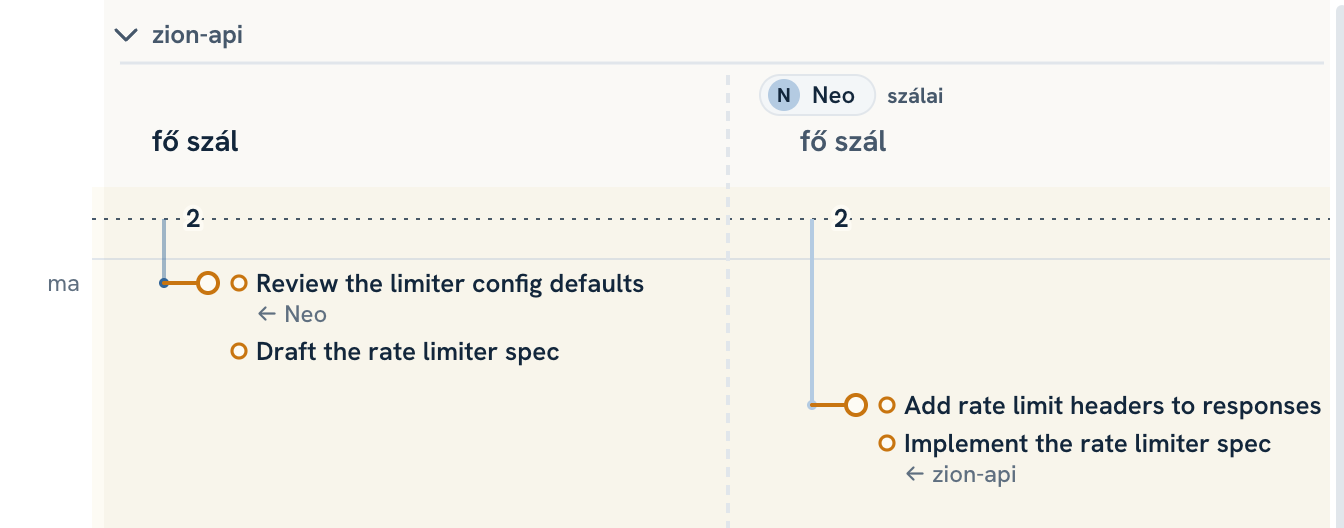
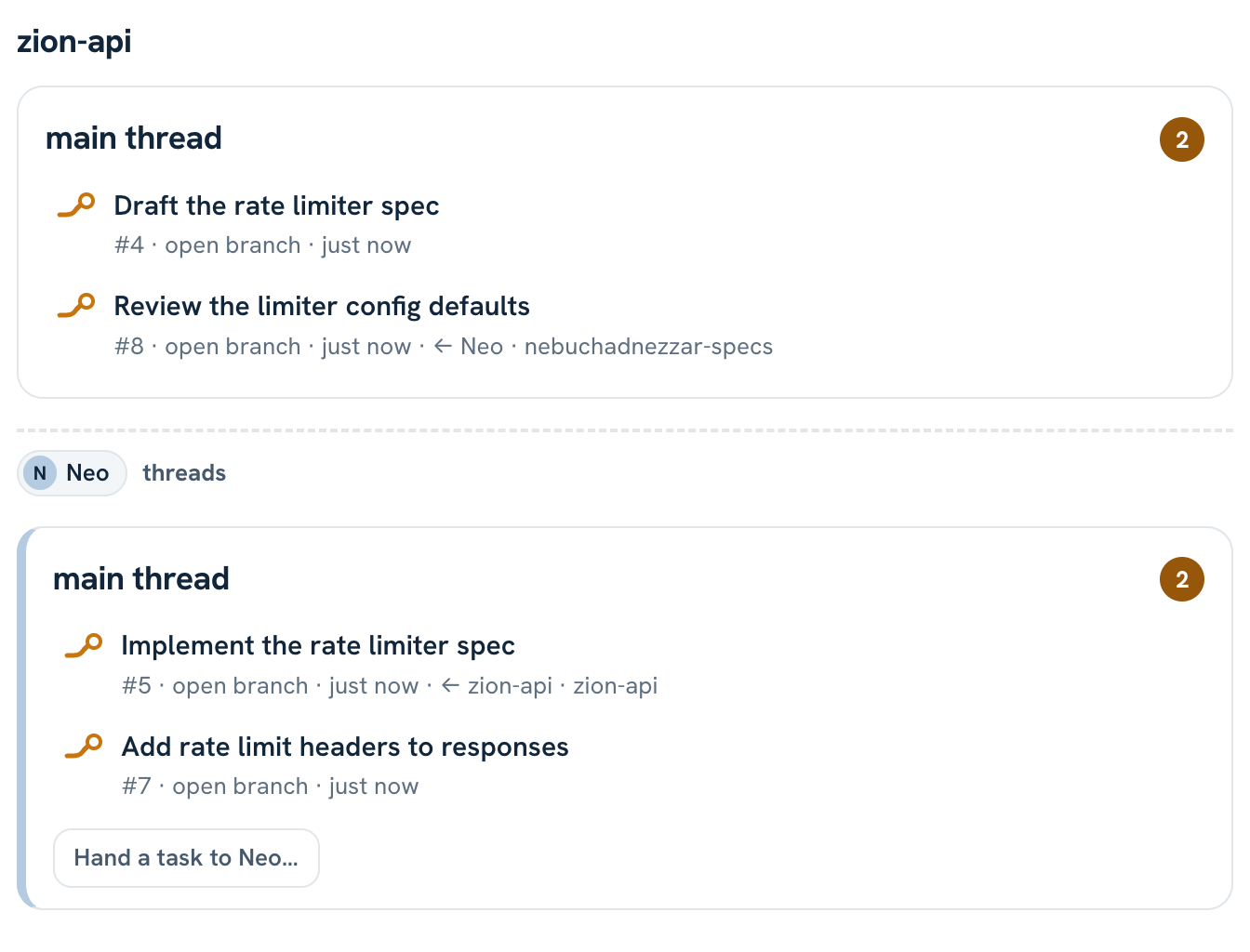
Térkép: a projekted oszlopában elöl a saját szálaid, utánuk szaggatott elválasztó, majd munkatársanként egy halványan csíkozott sáv, halvány kék vonallal és Neo jelvényével: az arcképével, ha van, különben a monogramjával. Ha van munkatársi sáv, a saját szálaid fölött a te beceneved jelvénye áll.
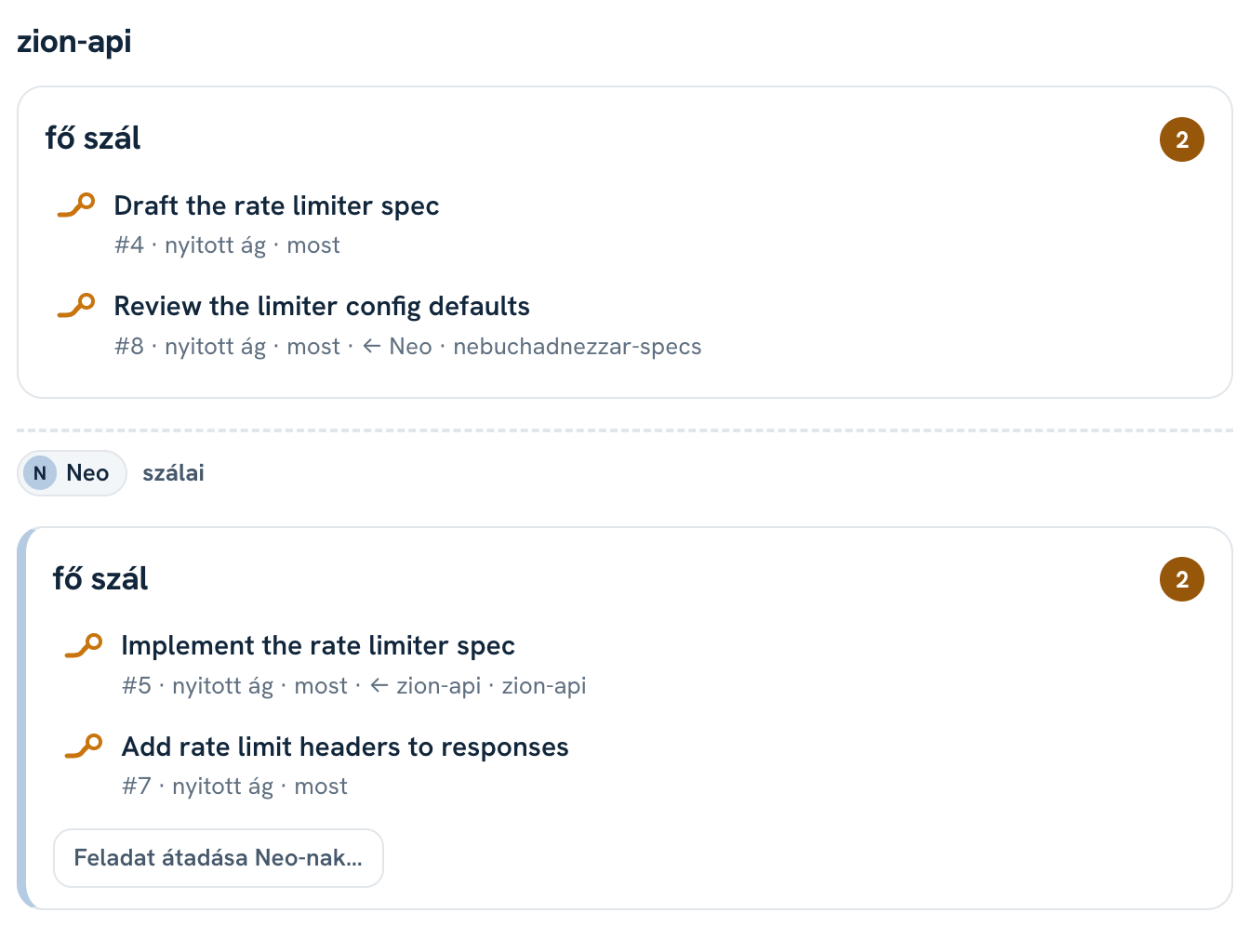
Lista: projektenként előbb a saját kártyáid, utána munkatársanként egy szakasz. A munkatárs kártyáján bal oldali halványkék csík és a becenév látszik.
Szűrő: az eszközsor „Csak az enyém / Mindenki” kapcsolója elrejti vagy mutatja a munkatársak munkáját, a térképen és a listán is. Az „Inaktívak” kapcsolóval azok is látszanak, akiknek nincs nyitott sessionjük a közös projektben: a többiek után, és ha nincs látható munkájuk, üres sávval.
Parancssor: az offtrack list a munkatárs szálait külön blokkban, a becenévvel írja ki.
Térkép Trinity nézetéből: jobbra Neo sávja, benne az átadott feladat.Ugyanez listán: előbb a saját kártyáid, alattuk Neo szakasza.
A munkatárs szálai és tételei csak olvashatók: nem zárhatod le, nem nyithatod újra, nem nevezheted át őket, és megjegyzést sem írhatsz rájuk. Ezt a szerver ellenőrzi, nem csak a felület. Neónak a saját nyitott ágadat vagy kézi teendődet adhatod át, a tétel menüjéből („Átadás Neo-nak…”): a szöveget és a határidőt átírhatod, a te tételed lezárul, nála megjelenik az új. A térképen mindkettőtöknél nyíl köti össze a forrásszál kapcsolatát az átadott tétellel. Ha Neo lezárja a feladatot, az az időablakon belül halványan, pipával a sávjában marad. A munkatárs tételére vagy megállójára kattintva a teljes szöveget és az időpontot látod, csak olvashatóan.
Szintváltás és megszüntetés
Fel, projektszintre: felkéréssel, amelyet a másiknak el kell fogadnia (lásd fent).
Le, feladatszintre: bármelyik fél egyedül, azonnal: Fiókom oldal, „Csak feladatszint”, vagy offtrack cowork Neo task.
Megszüntetés: bármelyik fél egyedül: Fiókom oldal, „Megszüntetés”, vagy offtrack cowork Neo end. Az átadott feladatok a címzettnél maradnak, de a forrásoldal nem látja többé az előrehaladásukat. A lezárásukról a forrásszál továbbra is értesítést kap.
Több projektpár: ha ugyanazzal a munkatárssal több projektedben is együttműködsz, a --project <saját projekt> választja ki a párt.
A Fiókom oldalon állítod be a becenevet, és itt vált szintet vagy szünteted meg az együttműködést.
Repócímkék
Egy session több repóhoz is hozzányúlhat: Neo a backend repójából indítja a Claude Code-ot, de a webes repóban is dolgozik. Ezért minden tétel megkapja, melyik repót vagy repókat érinti.
Claude adja meg jelentéskor az offtrack_reportrepos mezőjével, nyitott ágnál azokat a repókat is, amelyeket a teendő érinteni fog.
Ha nem adja meg, a kliens az előző jelentés óta szerkesztett fájlokból számol, végül a session könyvtárából.
A címke a tétel meta-sorában látszik, például „api · web”. A tulajdonos a tétel menüjében (Repócímkék…) javíthatja.
A kliens repónként két dolgot küld: a remote címéből számolt sózott lenyomatot és a repó gyökérkönyvtárának nevét (ez a címke). A repó címe nem hagyja el a gépet. Részletek a telepítési útmutatóban.
Kérd Claude-tól
Az együttműködés műveleteit Claude csak a kérésedre végzi el.
Mondd ezt
Claude ezt teszi
„ki dolgozik még ezen a repón?”
offtrack_coworkers: a becenevek listája
„add át ezt Neónak fejlesztésre”
offtrack_reportto: "Neo"-val
„oszd meg a #412-t Trinityvel”
offtrack share-item 412 Trinity
„kérj projektszintű együttműködést Neótól a billing projektemre”
offtrack_coworkrequest
„fogadd el Morpheus felkérését”
offtrack_coworkaccept
„mutasd az együttműködéseimet”
offtrack_coworklist
„Morpheusszal csak feladatszinten dolgozzunk”
offtrack_coworktask
„szüntesd meg az együttműködést Trinityvel”
offtrack_coworkend
Ugyanez parancssorból: terminálban, vagy Claude Code-ban ! előtaggal.
When several of you work on the same repos, each in your own offtrack project, you can hand tasks to each other and see how the shared work is going. Nobody can touch the other side's threads or items. This page walks through one team: Neo the developer, Trinity the business analyst (BA) and Morpheus the project manager (PM). General use is in the user guide.
Concepts
Nickname: a short name you choose. It is all your coworkers see of you: never your email address or your name.
Coworker: a user with a nickname who works on the same repo as you, or one you already cowork with.
Cowork: an agreement between one of your projects and one of your coworker's, at task or project level. It belongs to the two of you: the other members of your projects don't see your coworker's side. You can cowork with the same person in several project pairs, at a different level per pair.
Shared task: an item you handed to a coworker or got from one, or an item of yours you shared with them, together with the items linked to it.
Repo label: the repo name shown on an item, such as “api · web”: the repos the item concerns.
Nickname
Set your nickname on the Your account page or with offtrack nick neo. It is 2–24 characters, unique on the server, and case doesn't matter. With a nickname you agree that people working on the same repo can find you: you show up in the output of offtrack coworkers. It has no other use. Without a nickname nobody finds you.
offtrack nick "" clears it. You then drop out of the lookup. Your existing coworks stay, and your pending requests can still be accepted: the recipient sees the nickname you had when you sent them. Nobody else can take a cleared nickname, so your old coworkers never mix up two people.
Only someone who works on a repo can ask who else works on it: the client asks with the repo's fingerprint, and the server only answers for a fingerprint the asker knows too. The answer lists nicknames only, and whether you already cowork.
Task level: shared tasks
Trinity has specified the new billing endpoint in her own project. In her session she asks: “hand this to Neo for development”. Claude hands it off with the to: "Neo" field of offtrack_report. The item lands on the main thread of Neo's project, Trinity's item closes, and a task-level cowork starts between them.
Who you can hand to: someone who works on one of the task's repos, or someone your project already coworks with. An item without a repo label goes only to an existing coworker.
Which of their projects: the one already coworking with your project; otherwise the one whose roots include the task's repo. The recipient can move it between their projects, and the cowork follows: Trinity still sees it, even on an archived thread, along with the items linked to it before the move.
Progress: while Neo's session keeps the task in progress, its further reports (milestones, new open branches) link to the task. Trinity sees them in Neo's band, on the thread where Neo reported them. For new open branches and manual to-dos she also gets a note on her source thread; only Trinity gets it, not the other members of her project. Work by other members of Neo's project never links to the task, even if they set it in progress. Claude can also link explicitly with the parent_item_id field.
Where it came from: next to the item Neo sees “← Trinity: #12”: Trinity's nickname and the source item's id, without the project name.
Closing: when Neo finishes or drops it, Trinity's source thread gets a note, just like a hand-off between projects.
Neo gets stuck: he doesn't know how to round the invoice amounts. He asks: “hand this back to Trinity as a question: how do we round?”. That is a new shared task, this time with Trinity.
At task level you both see only the shared tasks, none of the other's work. To show an item of yours without handing it off: offtrack share-item <item-id> <nickname>. The item stays yours; your coworker can only see it.
Project level: the whole picture
Morpheus wants to see who works on what. He asks both of them for a project-level cowork: “ask Neo for a project-level cowork on my billing project” (offtrack cowork Neo project --project billing). This needs no common repo and no earlier cowork.
Neo accepts on the Your account page or with offtrack cowork accept Morpheus. If the server suggests no project, he picks his own when accepting (--project). Neo also gets an email with the commands to accept or decline (he can turn it off on Your account). A pending request shows as one line on the Your account page and in the session's [offtrack] block at startup; a session that's already running doesn't show it.
At project level each side sees every thread and item of the other's project, except private ideas. It works both ways: Neo sees Morpheus's project too. The work of the project's other members stays hidden.
What you see, and where
At task level: the shared tasks and the items linked to them.
At project level, also: every other thread and item of your coworker's project.
Never: your coworker's private ideas, email address or name.
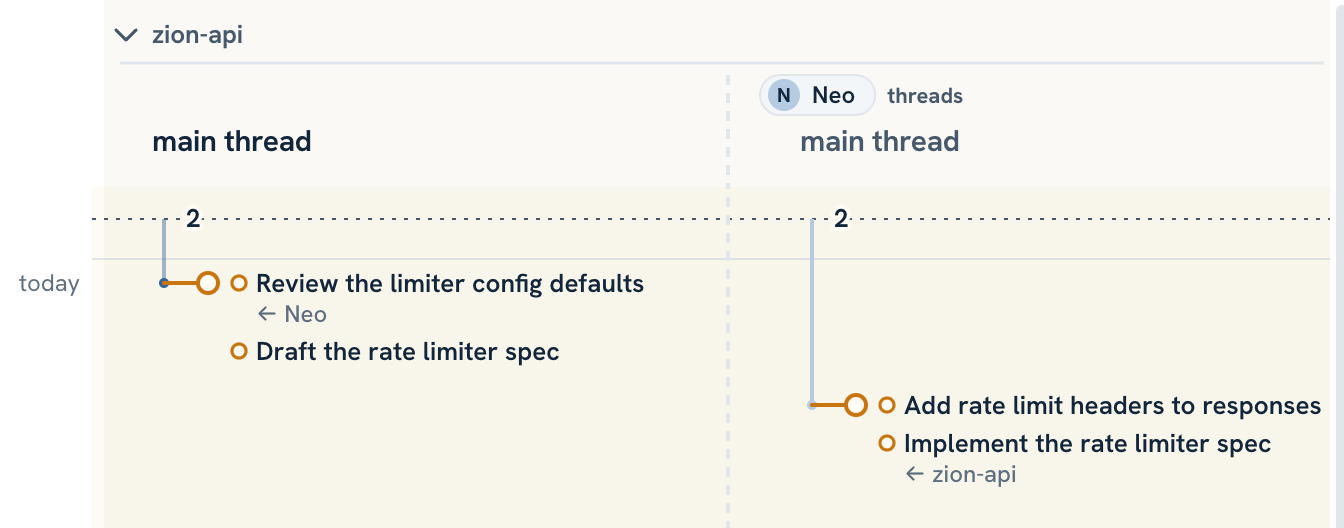
Map: in your project's column your own threads come first, then a dashed divider, then one faintly hatched band per coworker, with a pale blue line and Neo's badge: his profile picture if he has one, his initials otherwise. When there's a coworker band, your own nickname badge sits above your threads.
List: per project, your own cards first, then one section per coworker. A coworker's card has a pale blue stripe on the left and their nickname.
Filter: the “Only mine / Everyone” switch in the toolbar hides or shows your coworkers' work, on the map and the list alike. The “Inactive” switch also shows coworkers with no open session in the shared project: after the others, with an empty band if they have no visible work.
Command line:offtrack list prints a coworker's threads in a separate block, with their nickname.
The map from Trinity's view: Neo's band on the right, with the handed-off task.The same on the list: your own cards first, then Neo's section.
Your coworker's threads and items are read-only: you can't close, reopen or rename them, or add notes. The server enforces this, not just the interface. To give Neo work, open the menu of your own open branch or manual to-do and pick “Hand off to Neo…”: you can edit the text and due date, your item closes, and the new one shows up on his side. On both your maps an arrow links the source thread's link to the handed-off item. When Neo closes the task, it stays in his band within the time window, faded and ticked. Click your coworker's item or milestone to see its full text and time, read-only.
Changing level and ending a cowork
Up, to project level: with a request the other side has to accept (see above).
Down, to task level: either side, alone, at once: “Task level only” on the Your account page, or offtrack cowork Neo task.
Ending: either side, alone: “End cowork” on the Your account page, or offtrack cowork Neo end. Handed-off tasks stay with the recipient, but the source side no longer sees their progress. The source thread still gets a note when they close.
Several project pairs: if you cowork with the same person in several of your projects, --project <own project> picks the pair.
On the Your account page you set your nickname, and change level or end a cowork.
Repo labels
One session can touch several repos: Neo starts Claude Code in his backend repo but works in the web repo too. So every item records which repo or repos it concerns.
Claude sets them when reporting, with the repos field of offtrack_report; for an open branch, also the repos the to-do will touch.
If Claude gives none, the client works them out from the files edited since the last report, and failing that, from the session's directory.
The label shows in the item's meta line, for example “api · web”. The owner can fix it from the item's menu (Repo labels…).
Per repo the client sends two things: a salted fingerprint of the remote address and the name of the repo's root directory (that is the label). The repo address never leaves your machine. Details are in the install guide.
Ask Claude
Claude touches coworks only when you ask.
Say this
Claude does this
“who else works on this repo?”
offtrack_coworkers: the list of nicknames
“hand this to Neo for development”
offtrack_report with to: "Neo"
“share #412 with Trinity”
offtrack share-item 412 Trinity
“ask Neo for a project-level cowork on my billing project”
offtrack_coworkrequest
“accept Morpheus's request”
offtrack_coworkaccept
“show my coworks”
offtrack_coworklist
“keep it at task level with Morpheus”
offtrack_coworktask
“end the cowork with Trinity”
offtrack_coworkend
The same from the command line: in a terminal, or in Claude Code with the ! prefix.